English · United States / Buying decision guide
TV headphones for shared viewing: what happens to the soundbar?
This guide links to products on Amazon. As an Amazon Associate, Everyday Sift earns from qualifying purchases. That does not change what the guide recommends.
For a shared US living room, adding headphones is useful only if the room’s soundbar still behaves the way the other viewers need. Map both outputs before buying hardware.
Start with the exact TV and owned soundbar connections. Optical passthrough and HDMI ARC extraction are different routes. The documented simultaneous HAX06 route uses ARC and PCM stereo, so it does not preserve an eARC/Atmos setup while its headphone branch plays. Confirm the exact TV-side route before treating a component diagram as a compatible complete system.
How we checked this: we read the sources linked in this guide on the date shown above. We did not test anything hands-on.
Write down what must remain working
- Record exact TV model suffix, soundbar model and headphone/transmitter system. Note the actual source you watch: TV app, console or external player.
- Identify the owned soundbar’s current optical or HDMI ARC/eARC connection and required format. Does the family need surround/Atmos while headphones play?
- Check the exact TV manual for simultaneous output and independent volume. TV-speaker-plus-Bluetooth wording is not proof of soundbar-plus-headphone operation.
- Try suitable owned controls or an already-supported output before adding another box. If the needed behaviour remains unknown, stop the shopping list here.
These routes come from the transmitter, extractor and soundbar makers’ own documentation. We did not check any particular TV model. Your TV’s manual must confirm the output each route starts from: optical out, or HDMI ARC with eARC turned off, plus a PCM or Stereo digital audio setting. Neither diagram below is a tested setup or a physical listening test.
Optical example: Opera Plus and original Sonos Ray
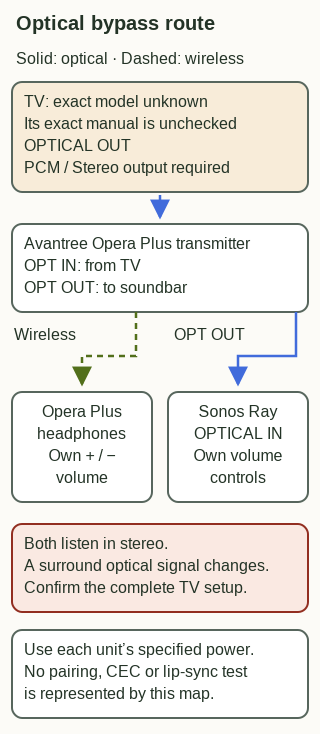
Avantree’s Opera Plus soundbar instructions document TV Optical OUT → Opera Plus OPT IN, then Opera Plus OPT OUT → soundbar Optical IN. The original Sonos Ray guide identifies Ray’s optical input. Follow Ray’s TV-audio setup in the Sonos app; do not treat its optical connection as HDMI ARC.
- Confirm the exact TV supplies the documented optical output and PCM/Stereo setting for the source you use.
- Connect TV Optical OUT to Opera Plus OPT IN.
- Connect Opera Plus OPT OUT to Ray Optical IN. The Opera Plus headphones use their transmitter link.
- Check both outputs and independent volume in the complete real setup. Ray control uses its documented IR/app/touch route rather than automatic HDMI-CEC over optical.
Avantree’s TV no-sound checklist, which covers Opera Plus, tells you to set the TV’s digital audio format to PCM. Consequently this example does not preserve an existing multichannel optical signal simply because Ray can accept other formats. Headphone volume has its own controls, but actual TV/remote behaviour has not been observed here.
ARC example: HAX06, original Sonos Arc and Opera Plus
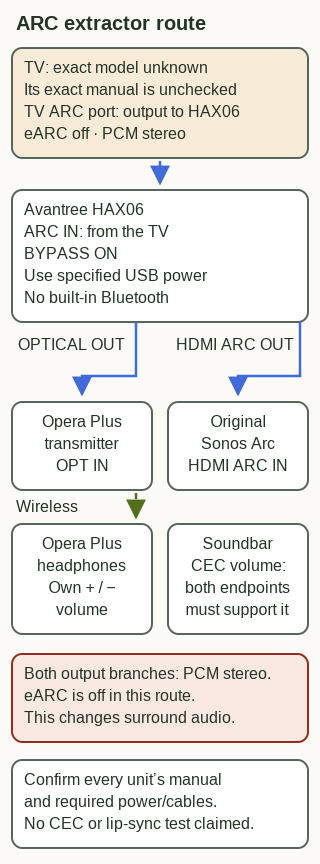
The HAX06 manufacturer specifications and FAQ describe ARC operation, with TV eARC disabled, Bypass ON and TV PCM for simultaneous HDMI ARC plus optical/RCA output. HAX06 has no Bluetooth: the headphone route still needs a transmitter/headphone system. It is an ARC audio device connected to the TV’s ARC port, not an ordinary HDMI-video splitter placed between a player and TV.
- Confirm the exact TV supports the specified ARC/PCM route for your source; eARC is off for this documentary example.
- Connect the TV ARC port to HAX06 ARC input. With Bypass ON, its HDMI ARC output goes to the original Sonos Arc’s HDMI connection.
- Connect HAX06 optical output to Opera Plus OPT IN, then use the Opera Plus headphones. Do not draw or expect a wireless branch directly from HAX06.
- Check both branches, sound format, each volume control and lip sync in the actual complete system before accepting it.
The original Sonos Arc guide describes its HDMI ARC/eARC connection, with an optical adapter route when appropriate. Arc has no native optical socket in this diagram, and Arc Ultra is a different model. The Sonos supported-format guidance does not cancel HAX06’s simultaneous PCM requirement.
If keeping surround or Atmos while both branches play is essential, this simultaneous HAX06 PCM route does not meet that requirement. Do not bury that tradeoff behind a claim that the bar supports Atmos. HAX06’s CEC volume route concerns HDMI, not optical/RCA; actual endpoint/remote reliability and lip sync remain untested.
Compare the routes by what they change
On small screens, scroll the table sideways.
| Documentary route | Soundbar path | Simultaneous-format tradeoff | Still open |
|---|---|---|---|
| Optical TV → Opera Plus → original Ray | Optical passthrough | PCM/Stereo for this Opera Plus setup | Exact TV output/source/menu and IR/app control behaviour |
| TV ARC → HAX06 → original Arc; optical branch → Opera Plus | HDMI ARC, eARC off | PCM stereo while both branches play; current Atmos/surround route lost | Exact TV support, CEC, complete kit and physical listening/remote behaviour |
Opera Plus’s interactive user guide says it does not pass HDMI ARC through its transmitter. Its ARC input capability therefore does not turn the first diagram into an HDMI passthrough solution for an owned ARC bar. Different Avantree models and earlier Opera products must be checked separately.
Price the complete missing kit, once
On small screens, scroll the table sideways.
| Your worksheet | Record before ordering |
|---|---|
| Owned equipment | TV, soundbar, headset/base, current ports and cables |
| Required behaviour | Both at once / independent volume / soundbar format / source app or device |
| Documented route | Exact TV and component manuals; unresolved endpoint marked unknown |
| Missing purchase | Needed extractor + transmitter/headset + missing suitable cables/power |
| Complete cost | Current tax/delivery and exact return terms; exclude suitable owned components |
| Acceptance check | Both outputs, controls, format, switching and lip sync on the actual system |
HAX06’s page displayed $79.99 on 23 October 2026, but its widgets did not establish an available delivered basket. HAX06 alone is not a complete wireless-headphone purchase. There is no current complete-price winner here.
If your setup matches one of the two documented routes, the parts are on Amazon US: the Avantree Opera Plus for the optical route, and the Avantree HAX06 for the ARC route, which still needs a headphone system such as the Opera Plus. Skip the HAX06 route if keeping surround or Atmos while both play matters to you.
Keep the free route and the stop rule
If your exact owned TV already provides the needed simultaneous soundbar/headphone route with suitable controls, extra hardware may be unnecessary. Conversely, a TV-speaker/Bluetooth feature from another model or region does not establish that an HDMI soundbar stays active. Check the owned manual and source behaviour rather than buying on a generic menu name.
These maps are documentation-based purchase checks. No comfort, latency, hearing benefit, codec superiority, seamless switching or CEC reliability was tested. If an essential format or exact TV-side route remains unresolved, wait or choose a fully documented alternative before spending. The Amazon links are affiliate links; the other links are not.