Air travel · device-specific / Decision guide
USB-C wired earbuds on a plane: check the audio connection before buying an adapter
USB-C wired earbuds are not a reliable match for a seat’s 3.5 mm headphone socket simply because an adapter joins the plugs. For digital USB earbuds, the missing piece is a compatible audio connection, not just the right-shaped hole. A seat’s USB charging port is not evidence that it supplies headphone audio either.
If you want the simplest backup for seatback films, take headphones compatible with the airline’s headphone socket. Keep your USB-C earbuds for a phone or tablet you have checked with them. This guide is based on manufacturer documentation, not an in-flight hardware test.
Scroll the diagram sideways to read all labels.
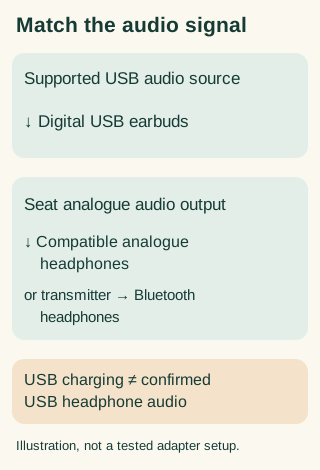
Start with the screen you will use
Your own phone or tablet: connect the earbuds directly and play something before travelling. If your entertainment depends on downloads, check those separately without an internet connection. Working headphones do not establish that a film is available offline.
The screen in the seat: find out what audio output that aircraft provides. Do not assume that the charging connector next to the screen is an audio output. Bose specifically warns that some USB-C devices do not provide audio and that adapters from a 3.5 mm socket may not work with its digital wired earbuds. Bose connection guidance
An airline service played on your own device: the connection is between that device and your earbuds. Check the airline’s entertainment instructions as well as your device compatibility; a USB-C plug alone settles neither question.
Why the familiar phone dongle may be the wrong purchase
Look at the advertised direction of the accessory. A dongle described as connecting 3.5 mm headphones to a USB-C phone is answering the reverse question: its source is the phone and its destination is analogue headphones. That description is not proof that it can take analogue sound from a seat and drive digital USB earbuds.
For any proposed converter, ask the seller for a supported connection using your exact earbud model and an analogue audio source. If the documentation only shows a phone and ordinary 3.5 mm headphones, do not treat it as the missing solution. We have not verified an active converter for this use and are not claiming none could exist.
Does AirFly solve it?
Only if the receiving headphones support the Bluetooth connection it uses. Bose describes AirFly Pro as taking sound from a 3.5 mm source and transmitting it to Bluetooth headphones. That does not make USB-only wired earbuds a Bluetooth receiver. Bose’s AirFly explanation
If you already have suitable Bluetooth headphones, our one-or-two AirFly guide addresses a different decision: sharing one screen versus listening to separate screens. It is not a USB-earbud conversion guide.
A useful check before departure
Write down three things: the screen you intend to watch, its documented audio output, and the exact connection your headphones accept. Check the whole path, including any adapter, rather than buying by connector names alone.
If one part is unknown, keep a simple alternative available. Buying a chain of unverified adapters at the airport is a poor substitute for confirming the connection beforehand.
Manufacturer information checked 19 October 2026. Aircraft equipment and individual device compatibility can differ.